

/compliance-rosette-check.svg)









Why should you read this report?
Coretax shows how mobile banking malware has moved beyond basic credential theft. This sample combines social engineering, Accessibility abuse, overlays, screen visibility, and live operator support to turn a trusted banking session into a fraud opportunity.
The report breaks down how the attack works from the victim’s first interaction with the fake app through to credential capture, session control, data exfiltration, and defensive disruption. It also explains where Coretax overlaps with M-Pajak malware and how it fits into wider Android RAT activity targeting banking users.
In this report, you will learn:
-
How Coretax and M-Pajak naming overlaps across tax-themed Android malware campaigns
-
How the malware uses onboarding screens, permissions, and Accessibility access to gain control
-
How overlays, screen mirroring, and simulated input support live banking fraud
-
What the HTTPS, WebSocket, and streaming channels reveal about the malware’s C2 model
-
Which app, network, protocol, and hash indicators can help analysts identify Coretax activity
-
How runtime defenses can disrupt screen visibility, UI manipulation, and session control
Read the report below or download it.
Quick links:
The purpose and function of Coretax malware
How a Coretax malware attack commences
The screen flow that the victim sees during a Coretax malware attack
Coretax malware capabilities and attack functions
What Coretax can automate without direct operator input
What the action set reveals about Coretax capabilities
How Coretax sends data and receives commands
Stages of a Coretax-enabled banking fraud attack
Defensive controls and protection against Coretax
Coretax compromise and detection indicators
Coretax malware is more than a credential stealer
How Promon helps protect against Coretax-like malware
What is Coretax malware?
Coretax is an Android banking malware sample built to help a human attacker take control of a victim’s mobile banking session. The sample is best understood as a fraud-enablement tool. It helps move an attack from social engineering into live banking abuse.
In the accompanying video, Coretax Malware Demo: From Fake App Install to Device Control, the attack is shown as a live fraud workflow. A victim installs and trusts the fake app. The attacker gains visibility into the banking session, employing overlays to mislead the victim. Then, defensive controls block screen mirroring and simulated input.
Coretax and M-Pajak malware
In Indonesia and parts of Southeast Asia, similar tax-themed samples may be referred to as M-Pajak malware. This is because related campaigns impersonate Indonesia’s official M-Pajak and Coretax tax services. In this report, we use Coretax malware to refer to the analyzed fake Coretax-themed Android sample because the sample impersonates Coretax. But the naming overlaps with broader fake tax-app campaigns targeting Indonesian users.
Our blog post on Coretax RAT malware: A rising threat to banking security in Southeast Asia explains more about previous versions and new variants. But all the different strains tend to work in a similar way.
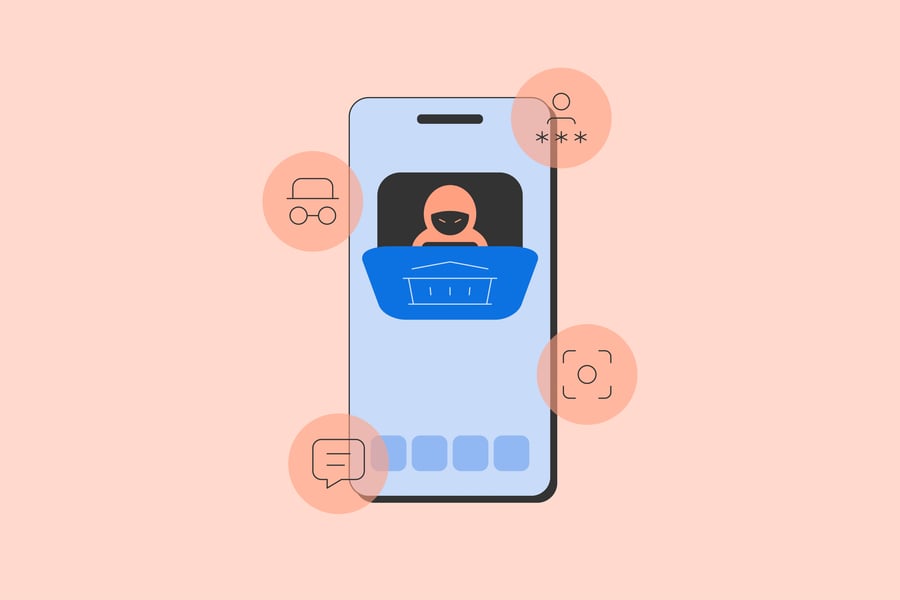
Across different campaigns, the common pattern is consistent: fake trusted apps, social engineering, Accessibility abuse, credential capture, overlays, and live operator support.
Lineage and related Android RAT activity
Coretax can be viewed in the wider context of Android RAT activity targeting mobile banking users. Public reporting has linked the broader Indonesian Coretax campaign to the GoldFactory threat cluster and to malware families such as Gigabud.RAT and MMRat. These names are useful for understanding the campaign ecosystem, but they should not be treated as interchangeable names for the specific sample analyzed in this report.
The same pattern is also visible outside Southeast Asia. Android RATs such as BTMOB show similar operational priorities: phishing-led installation, abuse of Accessibility, screen visibility, overlay support, data collection, and remote control. The infrastructure, branding, and regional lures may differ, but the goal is similar. These malware families are built to turn a trusted mobile session into an attacker-controlled fraud opportunity.
Read more: Promon discovers new Android banking malware, “FjordPhantom”
The purpose and operation of Coretax malware
What is the aim of Coretax malware and how does it work?
The purpose of Coretax malware
Its purpose is not just to trick the victim into logging in. Its real value is that, once installed and granted the right permissions, it can watch what the victim is doing, collect sensitive information, and help an attacker interfere with the session while it is happening.
From a technical perspective, the sample combines fivecore elements:
-
a staged onboarding flow that conditions the victim to trust the app
-
an Accessibility service that provides UI visibility and control
-
a command-and-control layer over HTTPS and WebSocket
-
bank-targeted credential capture and fraud-support logic
-
a screen mirroring functionality that enables the attacker to remotely monitor the victim’s device in real time
How Coretax malware operates
The communication model is important to understand how the malware operates. The client uses two distinct C2 channels with different roles.
The HTTPS channel is used for request-response traffic. This includes login, configuration retrieval, bank-list retrieval, state updates, and data submission. In other words, HTTPS is the management and exfiltration plane. It is how the client receives target definitions, reports on device state, and sends collected data back to the operator infrastructure.
The WebSocket channel is used as the live control plane. That gives the operator a persistent interactive path into the device rather than forcing them to work entirely through one-off HTTP requests. Through that channel, the client can receive action-driven instructions and maintain an active session while the victim is using the phone.
This separation matters technically. It means the malware is designed for both batch-style backend interaction and low-latency operator control. HTTPS handles stateful business logic and data exchange. WebSocket supports real-time control and session management. Together, they make the client suitable for live fraud operations rather than simple asynchronous data theft. In an Android context, this is significant because the malware can combine backend instructions with on-device Accessibility events, overlays, and live session control.
How a Coretax attack commences
The attack starts with persuasion rather than exploitation. The victim is convinced to install the application from a web page and to believe it is a legitimate service.
Once opened, the app does not immediately reveal its real purpose. Instead, it presents a sequence of ordinary-looking setup screens. The victim is led through login, password setup, and then permission and verification steps.
That sequence matters because it builds trust. The victim is made to feel they are completing normal account setup rather than enabling a malicious tool.
The screen flow that the victim sees during a Coretax malware attack
The onboarding screens are part of the fraud design. They make the app feel administrative and legitimate while moving the device into a state the attacker can use.
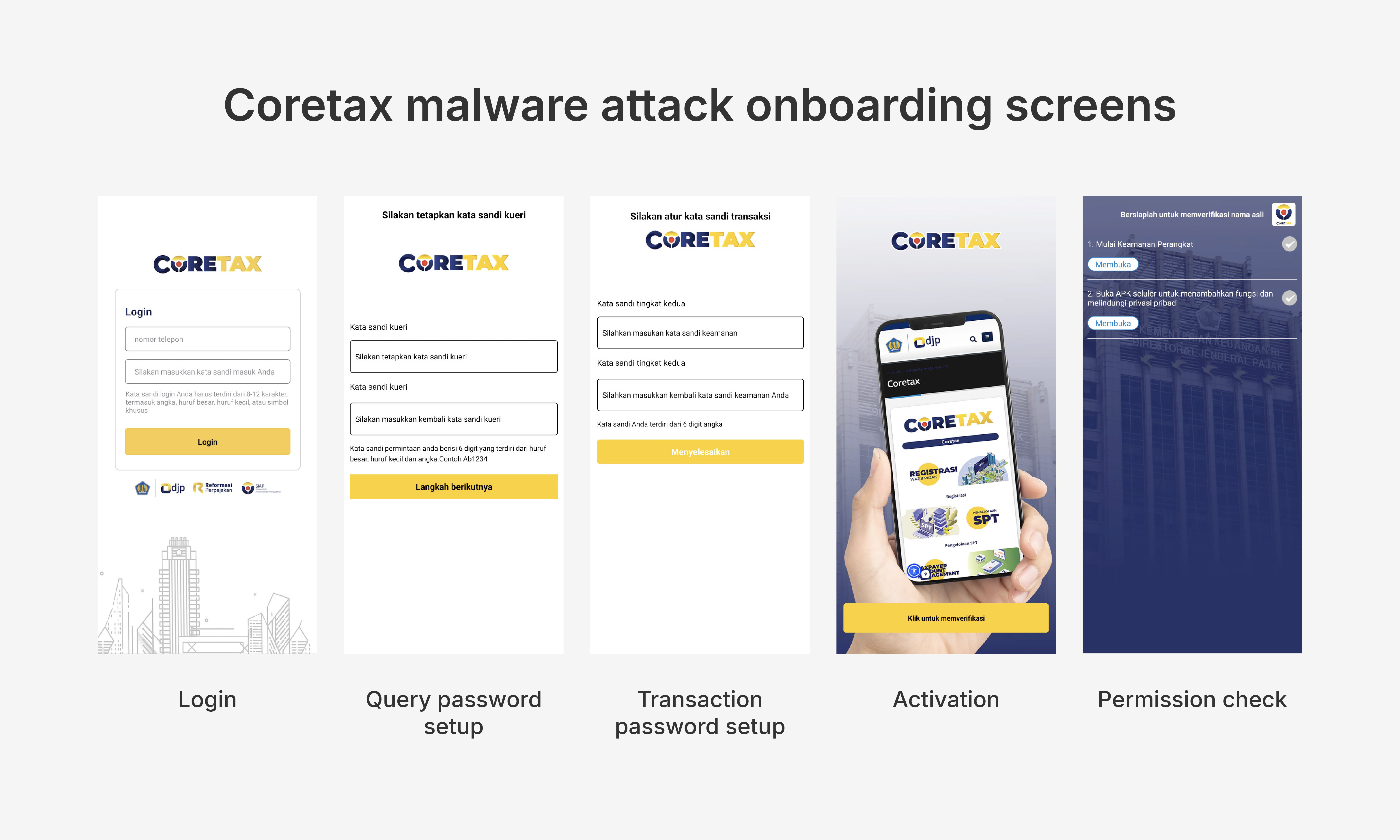
Login
The first screen presents the app as a normal sign-in page. At this stage, the victim still believes they are interacting with a legitimate service.
In the background, this is where the client establishes an initial state with the backend over HTTPS. The login response is not just an authentication result. It seeds the rest of the client state, including whether the user already has stored password values and which onboarding branch should run next.
Technically, this is where the client determines whether it must send the victim through the password-setup workflow or can move forward into activation and permission handling. This is also the stage where the client begins refreshing supporting configuration from the backend, including bank metadata and language-related data used later in the flow.
Traffic behavior at this stage:
-
`HTTPS`: login request and follow-on configuration pulls
-
`WebSocket`: not yet the main mechanism, but the client may begin preparing or retrying its persistent control connection in the background after initial state is established
Query password setup
The app can then ask the victim to set what it calls a query password. This appears to be a routine security measure. In fact, it keeps the victim engaged and reinforces the idea that the application is legitimate.
In the background, this screen is mainly local validation. The client collects the value, verifies the confirmation entry, and stores it in local state so it can be carried into the next screen. No attacker effort is required here once the victim is on the page.
From a technical standpoint, this screen is useful because it keeps the victim in a controlled workflow while the client prepares the next server-backed state transition.
Traffic behavior at this stage:
-
`HTTPS`: typically, none required to advance this page
-
`WebSocket`: not used to drive the visible screen; if active at all, it is background session maintenance rather than UI progression
Transaction password setup
The next screen asks the victim to set a transaction password. This is important because it frames the app as a trusted place for handling sensitive financial actions.
In the background, this is the first post-login screen where the server becomes directly involved again. The client sends both the previously collected query password and the newly collected transaction password back to the backend so that the account state on the server side remains consistent with what the victim sees locally.
Technically, this screen is a state commit step. The client uses it to finalize the password-setup workflow and move the user into the activation phase.
Traffic behavior at this stage:
-
`HTTPS`: password state update back to the backend
-
`WebSocket`: still not the channel that advances the page; any websocket activity here is background control-plane behavior rather than the visible password flow
Activation
This is a transition step that keeps the victim moving. It does not look overtly malicious, but it guides the user deeper into the setup process.
In the background, this screen serves as a bridge between fake account setup and operational enablement. At this point, the client is no longer mainly concerned with account-state consistency. It is transitioning the victim toward the system settings and permission conditions the malware needs in order to operate.
-
`HTTPS`: low-volume state and configuration traffic may continue
-
`WebSocket`: becomes more relevant because the client is moving toward a live-control-ready state, even if the victim is still seeing a benign-looking transition screen
Permission check
This is the most important onboarding screen operationally. It pushes the victim to enable the permissions and system features the malware needs, especially Accessibility access.
In the background, this is the point where the malware is converting social engineering into technical control. The client can retrieve supporting configuration, open required system pages, and invoke internal setup helpers that are meant to reduce friction around Accessibility, installation, screen-streaming approval, overlay permissions, and related device-control prerequisites.
This stage is also where the split between HTTPS and the live control channel starts to matter more. The client is still using HTTPS for stateful request-response logic, but it is moving toward a device state where the persistent control channel and Accessibility service become the primary operational mechanisms.
Traffic behavior at this stage:
-
`HTTPS`: configuration retrieval, state updates, and setup-related requests continue
-
`WebSocket`: may already be active or reconnecting in parallel, because once permissions are in place the operator can begin using the device interactively
Wait / verification state
The final holding state gives the impression that the application is verifying or preparing the account. By this point, the malware may already have the access it needs to start active monitoring and control.
In the background, this is effectively a ready state. The client can remain synchronized with the backend over HTTPS, maintain or re-establish its persistent control channel, and wait for the victim to enter a useful context such as a banking session.
Once that happens, the runtime behavior shifts from onboarding logic and into operational logic. The Accessibility service becomes the primary telemetry source, the live control path becomes relevant for interactive fraud support, and the bank recognition and credential-capture pipeline can begin processing the victim’s banking activity.
Traffic behavior at this stage:
-
`HTTPS`: ongoing state reports, data submission, configuration refreshes, and later exfiltration
-
`WebSocket`: the main live command channel for interactive actions, session steering, and operator-driven behavior during banking activity
Permission model
Once the user finishes with the malware setup screens, the malware asks for Accessibility access that the user is supposed to give it with social engineering.
Once the victim enables Accessibility, the malware gains the ability to monitor the screen and interact with the phone’s interface. At that stage, the attacker no longer must guess what the victim is doing; it can automatically press approval on permissions access screens.
This is the capability that makes the sample operationally dangerous. On Android, Accessibility access can give malware the visibility and interaction surface it needs to monitor app screens, trigger gestures, and manipulate the user interface.
In the malware client, this behavior is centered in `FocusService`. That service is responsible for observing page changes, text changes, clicked nodes, focused fields, and global UI state. It also acts as the bridge into gesture injection, paste actions, auto-click behavior, and the bank capture pipeline.
Coretax malware capabilities and attack functions
This section breaks down the Coretax malware capabilities that enable screen monitoring, credential theft, session manipulation, and live attacker support during banking fraud operations.
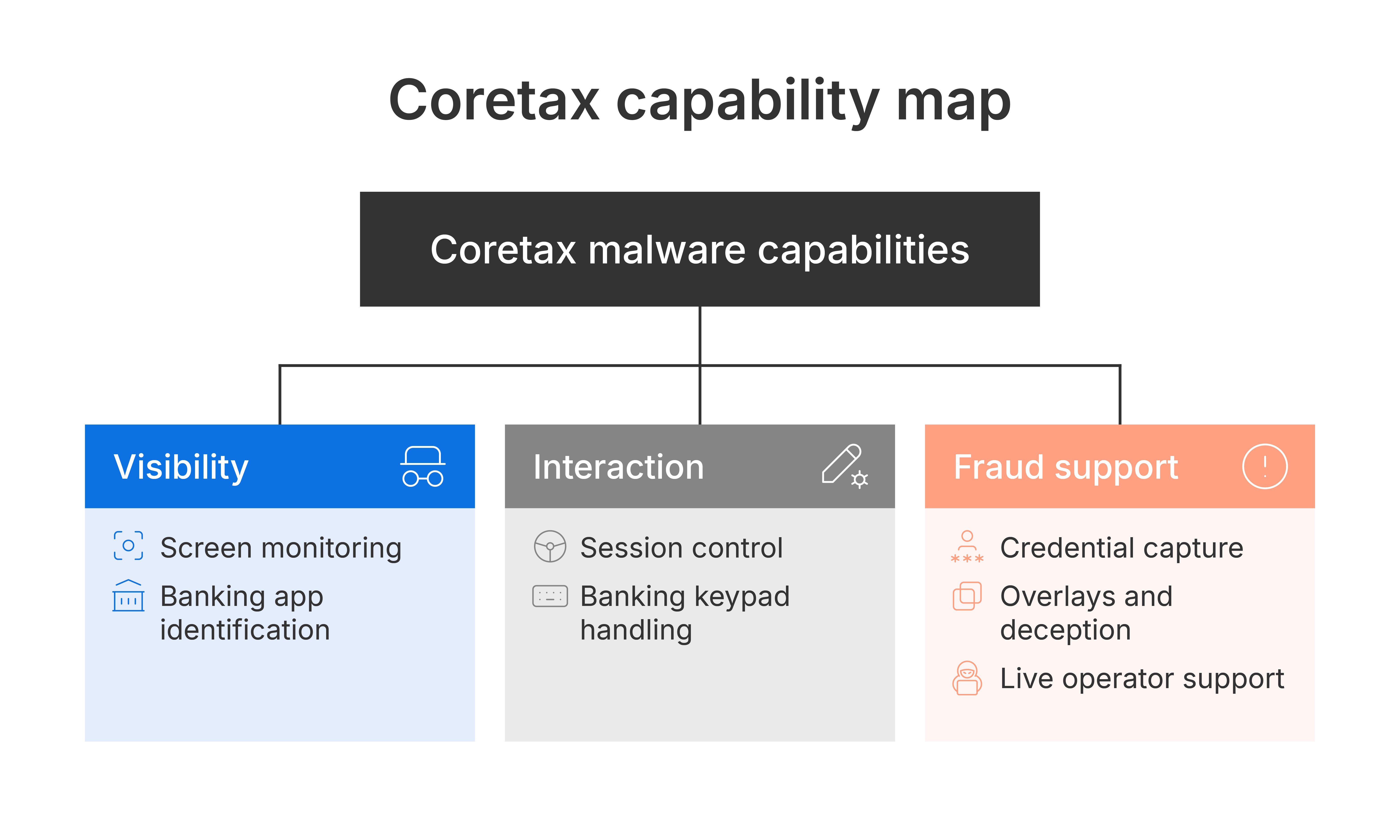
Watch the victim’s screen activity
The malware can monitor what is happening on the device in real time. It can recognize screen changes, track which app is currently open, and observe important user actions.
For an attacker, this means the malware can tell when the victim enters a banking app, reaches a login page, opens a transfer screen, or encounters a security prompt.
Technically, this is not just a screenshot stream. The client is processing Accessibility events, which means it can reason about the UI state.
Help control the session
The malware is not limited to watching. It can also help drive the session forward.
It can inject taps and gestures, place text into fields, and automatically click through some permission and approval dialogs. This gives the attacker practical control over parts of the device interface without requiring the victim to understand what is happening.
The observed action set shows that this control is broad. The attacker can move around the device, open apps, push the victim into settings or permission screens, and interact with live interfaces during a session.
The technical significance is that CORETAX is not just a collector. It has an active interaction surface. That makes it suitable for human-in-the-loop fraud rather than only background theft.
Identify banking apps
The malware can learn which banking apps are installed on the device and recognize when one of them is in use.
This matters because it allows the attacker to focus on the most valuable moments: when the victim is entering credentials, reviewing account balances, or moving through a sensitive transfer process.
It does not rely only on hardcoded assumptions. The client pulls a bank list from the C2 and uses that list to decide which packages should be treated as banking targets. In practical terms, that means the operator can update the list of target banking apps from the backend, and the client will adapt to those targets.
That bank list gives the malware two important advantages:
-
it can recognize real banking apps instead of guessing
-
it can be repurposed for different targets without rebuilding the APK
This is one of the more important architectural choices in the sample. It separates the malware client from the target list, which makes campaigns easier to retarget over time.
Capture banking credentials
One of the malware’s main capabilities is capturing banking login material.
It can reconstruct what the victim enters when interacting with a banking app, including PIN-style input and other password-like values. This is not limited to simple text capture. The sample includes logic built specifically to deal with banking input patterns and protected keypad-style screens.
The practical result is that the attacker can obtain credentials even when the victim is using a real banking application rather than a fake phishing page.
The active path validated in the client is:
-
`FocusService -> PasswordCapture2 -> BankCapture`
That path routes Accessibility events into bank-specific capture logic and ultimately into the credential upload path.
Use overlays to mislead the victim
The malware supports multiple overlay and masking behaviors. These are not cosmetic features. They are part of the fraud workflow.
The observed capabilities include:
-
dark or black overlays that can hide the real app underneath
-
light overlays used to alter the visible state of the screen
-
fake Coretax dialog that can hide the real app underneath
-
fingerprint-themed overlays that can make the victim believe they are completing a normal biometric approval step
-
anti-screenshot windows that can limit what is visibly captured or reviewed later
These overlays can be used in several ways during fraud.
They can distract the victim while the real banking app continues underneath. They can make a suspicious action look like a routine fingerprint confirmation. They can narrow the victim’s attention to a single prompt while the attacker continues working within the real banking session in the background.
The fingerprint overlay is especially relevant in a banking scenario because it can be used to make the victim believe they are simply confirming a legitimate action, while the attacker is using the real session to progress a transfer or approval flow underneath. In other words, the overlay can decouple what the victim thinks they are approving from what is in fact happening in the banking app.
Read more: Learn how to protect your apps against the new Android overlay threat
Overlays in action
The demo shows what this looks like in practice. The victim sees a verification-style screen, while the attacker continues working inside the real banking session underneath. This is the core risk of these overlays. They separate what the victim believes is happening from what the attacker is doing.
Support a live attacker
This malware is especially effective because it does not depend entirely on automation. It supports a live operator.
That means the attacker can watch the session as it unfolds, wait for the right moment, and then decide whether to observe, intervene, or guide the victim. This human-in-the-loop model makes the malware much more flexible than a simple scripted trojan.
If the attacker sees a transfer screen, an OTP step, or a bank-specific flow they recognize, they can adapt in real time.
That operator model is one of the reasons the malware does not need a universal fully autonomous banking bot. It only needs enough automation to lower friction and enough visibility to let a human attacker make decisions.
What Coretax malware can automate without direct operator input
Coretax is not fully autonomous, but it does automate enough of the setup and fraud process to make a live operator much more effective.
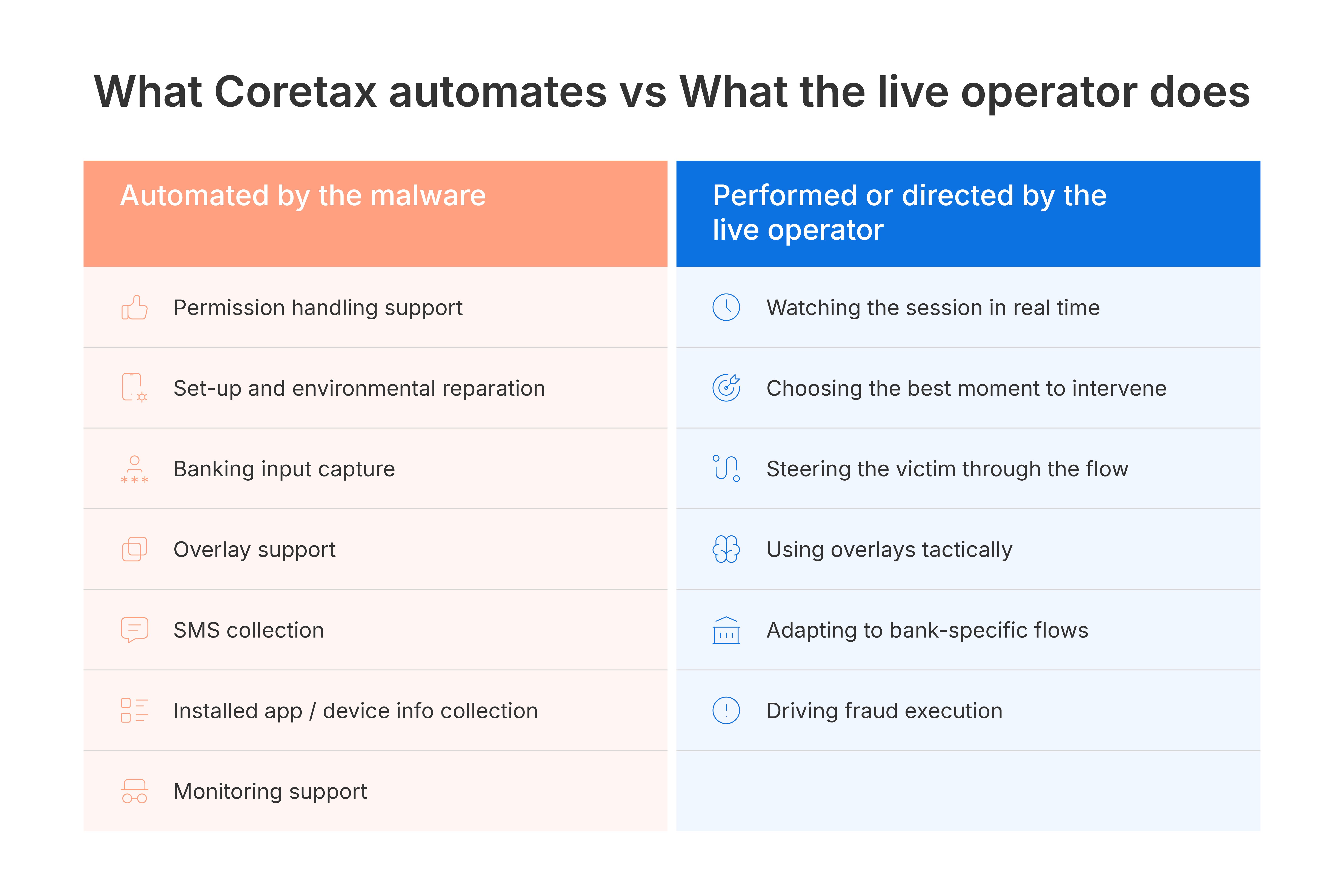
Automated permission handling
The malware can automatically click through parts of the permission and approval process once the victim is pushed into the right screens. This includes permission dialogs, screen-record approval flows, and some system setup paths.
That matters because permission friction is often the main obstacle in mobile fraud malware. Coretax is built to reduce that friction and keep the victim moving.
Automated setup and environment preparation
The malware can push the victim into Accessibility settings, installation-related pages, battery-management pages, and other device-control screens. Once there, its auto-click and UI interaction support can help the attacker get the device into a usable state faster.
This means the malware is not just waiting for the victim to figure out how to enable access. It actively helps complete that setup.
In practical terms, this reduces operator workload during deployment. The attacker does not have to manually step through every permission dialog if the client already knows how to click through common flows.
Automated banking input capture
Some of the most important automation is in the credential capture layer.
The malware can automatically watch for targeted bank apps, monitor sensitive screens, and reconstruct entered values without the attacker manually supervising every keystroke. This includes protected keypad-style flows where the malware maps or mirrors input rather than relying on ordinary text capture.
So even when a human attacker is involved, the malware is doing a large amount of the collection work for them.
Automated overlay support
The malware can show and hide several overlay types on demand, which means the attacker does not need to manually build deception into each step. The fraud-support interface is already in the client.
This is especially relevant for black overlays, bank-themed dialogs, and fingerprint overlays, which can be used quickly when a session reaches a sensitive moment.
Collect SMS messages
The sample can collect SMS messages from the device. That is directly useful in banking fraud because SMS messages often contain OTPs, approval codes, alerts, and transaction notifications.
Even when messages are not immediately useful, they still give the attacker more visibility into the victim’s banking activity.
Collect other useful information
The malware can also collect contacts, installed apps, and device status information.
This gives the attacker a broader profile of the device and helps them understand what financial apps are present, what kind of victim they are dealing with, and what other fraud opportunities may exist.
Installed-app collection is especially important because it helps the attacker identify which banking or financial apps are worth targeting.
Support live monitoring
The sample also supports live streaming functions for the screen, camera, and audio paths. In the observed environment, these capabilities are tied to RTMP and related streaming workflows. This increases the attacker’s ability to monitor the victim’s environment and make better decisions during an active fraud session.
Even if every one of these features is not used in every attack, the capability set shows that the malware is built for sustained interactive control rather than one-time credential harvesting.
What the action set reveals about Coretax capabilities
The observed action set reinforces that this malware is designed for active fraud support rather than passive collection alone.
The command families map cleanly to operational goals:
-
session maintenance
-
navigation and app steering
-
overlay control
-
data collection
-
Streaming
-
permission enablement
-
capture-specific support
Session and device control
The attacker can keep the session alive, reset parts of the client, show or hide logs, and move around the device interface. This helps maintain control during a long-running fraud attempt.
This matters because banking fraud sessions are often time-sensitive and stateful. Losing control of the client mid-session reduces the attacker’s chance of success.
Navigation and app steering
The malware can send the user backward, home, or into recent apps, open target apps, open URLs, and launch settings or setup pages. This allows the attacker to steer the victim toward the right application or screen at the right time.
That steering capability makes the malware more than a passive monitor. It can guide the victim into the precise context where credential capture or transaction support is most useful.
Overlay and visual manipulation
The malware can open and close dark overlays, light overlays, fake bank dialogs, fingerprint-themed overlays, anti-screenshot windows, and other fitting or masking windows. These are central to how an attacker can shape what the victim sees during a live session.
Data collection
The malware can trigger SMS collection, contacts collection, installed-app inventory upload, and cloned-app listing. That gives the attacker context, approval messages, and a broader picture of the device.
Streaming and monitoring
The malware can start and stop live screen and camera streaming, including RTMP-oriented workflows. That allows the operator to shift from background collection to live observation.
The combination of event-based UI monitoring and streaming support gives the attacker both structured and unstructured visibility into the device.
Permission and setup automation
The malware can open permission-related flows, accessibility settings, battery-management pages, install pages, and related device-control screens. Combined with its auto-click behavior, that makes it easier to push the device into a usable state for fraud.
Banking and capture-specific support
The malware can trigger text-capture and bank-text-capture flows, show bank-specific overlays, and switch its backend control addresses. It also relies on a C2-provided bank list, which means target banking packages can be updated from the server side. These features make it adaptable during a live campaign.
This is the clearest evidence that the client was designed to be re-tasked and maintained rather than run once and discarded.
Read more: Mobile malware threats in 2025: How mobile app vendors can stay safe
How Coretax sends data and receives commands
The malware does not use one channel for everything. In general:
-
`HTTPS` is used for login, configuration, state submission, and exfiltration
-
`WebSocket` is used for live control, command delivery, and interactive session management
The client-side command model is action-driven, but the data leaving the device is organized by function.
Login and account state
During the onboarding flow, the client sends account and setup state over HTTPS.
This includes:
-
login requests
-
password state updates during the query-password and transaction-password stages
-
configuration refreshes used to keep the client aligned with the backend
Operationally, this tells the server:
-
which device is active
-
which account state the victim has reached
-
whether the client should continue onboarding or move into an operational state
Bank targeting data
The client pulls its bank target list from the backend over HTTPS rather than sending this data from the device. What the device sends back is the resulting context:
-
which banking app is active
-
which capture path has been triggered
-
later, the resulting credential material
This matters because the targeting logic is server-influenced, while the recognition and capture happen on-device.
Input Capture
The malware either automatically logs the inputs made in banking app from a list it gets from the C2 or with a command send by the attacker on specfic app/whole device, it sends them back over the WebSocket channel.
The transmitted content can include:
-
bank identity
-
reconstructed bank password or PIN
-
related phone or account context when available
-
additional password fields when relevant to the flow
-
any text or keyboard input
Technically, this is the highest-value exfiltration path in the sample because it converts on-device banking interaction into reusable credential material for the operator.
SMS messages
When SMS collection runs, the client queries the inbox locally and uploads the result over HTTPS.
The transmitted object shape includes fields corresponding to:
-
sender or phone number
-
message content
-
message time
This gives the server OTP values, alerts, and transaction-related context. Even an empty result still tells the backend that the collection path executed.
Contacts
Contact collection is also sent over HTTPS. The purpose is less about immediate fraud execution and more about victim profiling, follow-on targeting, and understanding the device’s social context.
Installed applications
Installed-app inventory is uploaded over HTTPS. This is a large payload because it can include not just app identity but also icon data and version details.
From the attacker’s perspective, this tells the backend:
-
which banks or wallets are installed
-
which financial brands are available on the device
-
whether the device is worth additional effort
Device and service telemetry
The client also sends operational status information back to the backend over HTTPS.
This includes:
-
websocket or runtime error logs
-
command reporting
-
service and state telemetry
-
environment and device details
This is important because it gives the operator feedback about whether the implant is healthy, what stage the victim is in, and whether recovery or re-steering is needed.
Live session control
The live command path is maintained over WebSocket.
What travels over that channel is not bulk exfiltration. Instead, it is session control:
-
incoming actions from the operator
-
keepalive and session-management traffic
-
live control instructions tied to navigation, overlays, streaming, and interaction
This is what allows the attacker to work with the device interactively while the victim is using it.
Streaming and observation
The sample supports live screen, camera, and audio streaming. Those paths are separate from ordinary HTTPS exfiltration. In the observed environment they are tied to RTMP and related streaming workflows.
Operationally, that means the malware sends:
-
live visual session data
-
camera view data
-
audio-related data
These streams are what let the operator move from static reporting into real-time observation.
Overlays and on-device deception
The overlays themselves are rendered locally, but they still feed back into server-side operations indirectly.
When overlays are used successfully, the backend benefits because:
-
the victim stays engaged in the intended flow
-
the operator gets more time to act inside the real app
-
banking, SMS, and state telemetry continue to arrive while the user is being visually misdirected
In other words, overlays do not mainly send data by themselves. They improve the conditions under which other high-value data is collected and used.
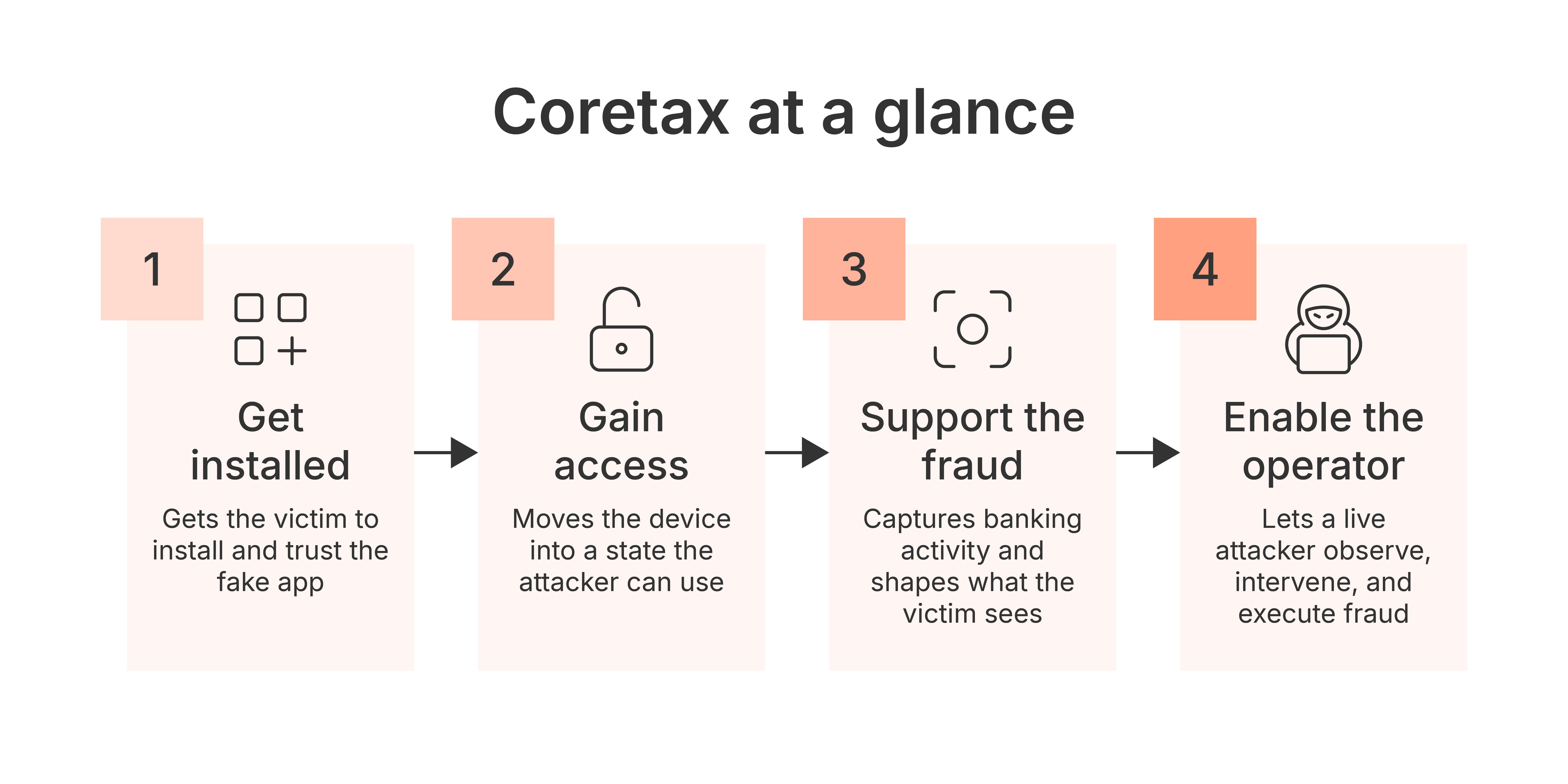
Stages of a Coretax-enabled banking fraud attack
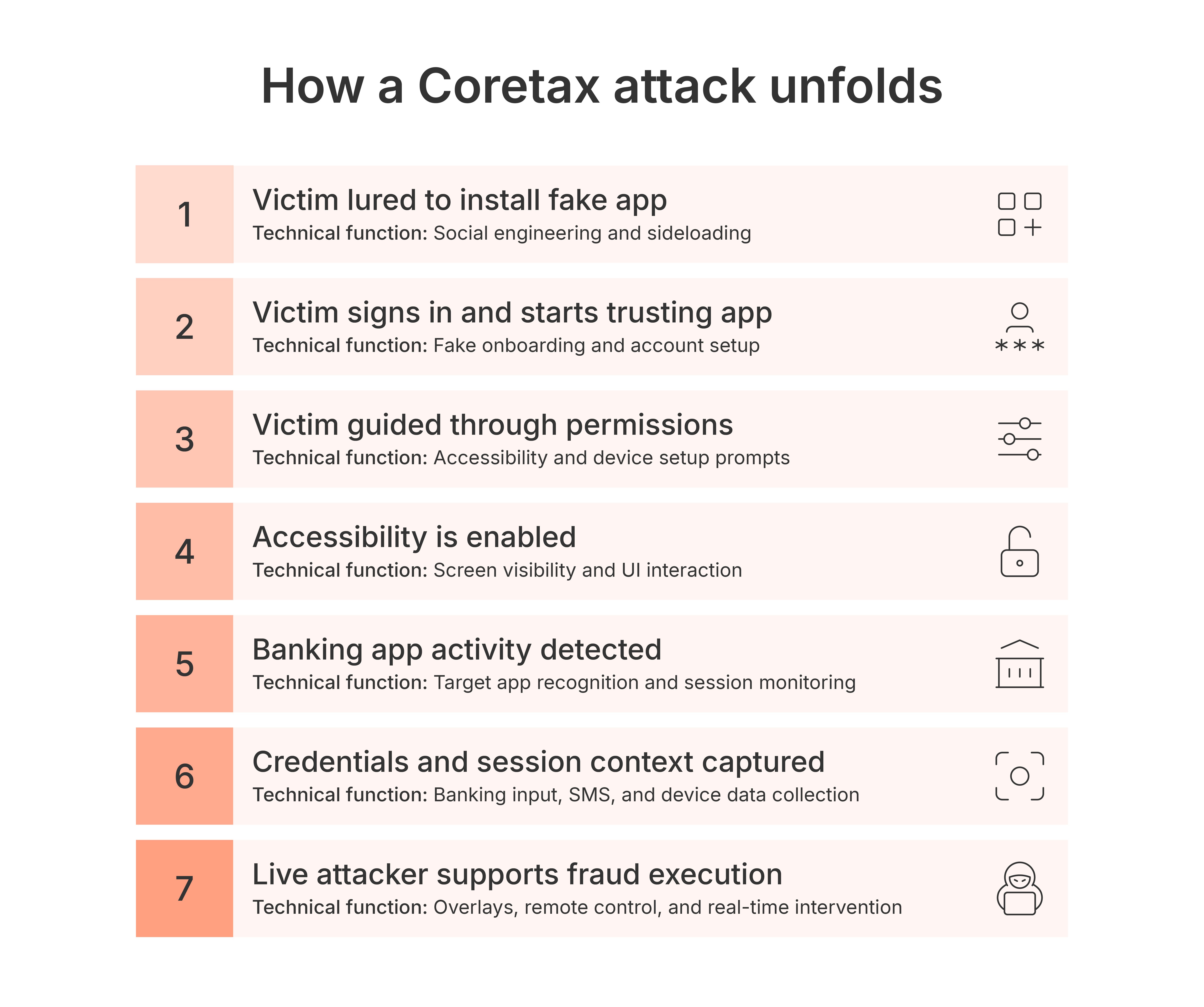
A likely attack flow is straightforward and is executed in these stages.
-
The victim is convinced to install the app and trust it.
-
The victim is guided through a sequence of screens that make the app seem legitimate and gradually grant it more power.
-
Once Accessibility is enabled, the malware begins watching the device closely.
-
When the victim opens a banking app, the malware recognizes it and starts monitoring the sensitive interaction.
-
The attacker captures credentials, watches the victim’s session, and uses overlays or interface control to keep the victim moving in the desired direction.
-
The attacker uses that visibility and control to support banking fraud, potentially with help from captured SMS messages or other approval steps.
This is why Coretax malware is dangerous. It does not need to do everything automatically. It only needs to create the right technical conditions for a live attacker to succeed.
Defensive controls and protection against Coretax
The demo video shows where protection can disrupt the attack chain.
-
Blocking untrusted screen reader behavior limits the malware’s visibility into the session.
-
Blocking screen mirroring reduces live attacker observation.
-
Blocking simulated or injected input prevents the attacker from using remote control to manipulate the banking flow.
These controls provide protective value because Coretax depends on visibility, deception, and live interaction working together.
Read more: Unveiling the Q2 App Threat Report: The state of financial services’ malware defense
Coretax compromise and detection indicators
This section summarizes the observable indicators that can help analysts identify Coretax-related activity across the app package, network traffic, device paths, and protocol behavior.
App indicators
-
package name: `app.qlgxz.ftgtg`
Network indicators
-
`app.tjyns.top`
-
`137.220.191.44`
-
`8.219.85.91`
-
`101.37.81.24`
High-value paths seen in the sample
-
`/x/command`
-
`/x/login`
-
`/x/common-bank-list`
-
`/x/common-sms`
-
`/x/common-app`
-
`/x/user-bank-pwd`
-
`/x/user-edit`
-
`/x/ws-log`
-
`/x/command-report-batch`
Protocol clues
header `Type: encryption`
encrypted requests wrapped into a `body` value
WebSocket control path on `/x/command`
Hashes
-
F928d51543721a2a39d3315cd03a1699da2f5ed077b0aef5279447a5cde748a6 - CORETAX.apk
-
9fa6f5359e1066c564c3dd573aae230eaaec26d866173e27e870fa45cc95f1df - AppDex_<versioncode>.zip
Coretax malware is more than a credential stealer
Coretax is dangerous because it combines deception, device visibility, targeted banking capture, overlays, and live operator support.
Its strength is not one single feature. Its strength is the way those features work together in a combined fraud workflow:
-
it convinces the victim to trust it
-
it gains powerful access through Accessibility
-
it watches the victim’s banking behavior
-
it captures credentials
-
it uses overlays, including fingerprint-style overlays, to shape the victim’s understanding of the session
-
it gives a live attacker enough control to turn that access into fraud
That makes it a practical tool for mobile banking abuse, not just a fake app or a basic credential stealer. In Android banking fraud, that combination matters more than any single feature because the attacker needs access, visibility, deception, and timing to work together.
Read more: Mobile banking apps: A guide to mitigating fraud
How Promon helps protect against Coretax-like malware
This report on Coretax malware shows why mobile banking protection needs to work inside the app, at runtime. The attack depends on more than installation. It needs visibility into the user’s screen, abuse of Accessibility, overlay-based deception, simulated input, credential capture, and live operator support.
Promon helps protect against this type of abuse by detecting and blocking risky runtime behavior inside the app environment. That includes those we’ve highlighted in this report, such as untrusted screen readers, screen mirroring, overlay attacks, emulated or injected input, and other signals that suggest the banking session is being observed or manipulated.
Coretax-style malware is most dangerous when its capabilities work together. By disrupting screen visibility, UI manipulation, and session control, Promon helps reduce the attacker’s ability to turn a trusted banking session into fraud.
_edited.png?width=600&name=responsible_disclosure-03%20(1)_edited.png)