

/compliance-rosette-check.svg)









Why should you read this report?
GPU debugging tools are built to help developers inspect and troubleshoot rendering. But on Android, the same supported mechanisms can provide an injection path into a running app. Mobile games are an attractive target, but the underlying technique can affect other apps that render through Vulkan too.
Promon’s Security Research team investigated how techniques already familiar from PC gaming transfer to Android through Vulkan layers. The research shows how a malicious layer can run native code inside a target app through a supported system path, and why many standard anti-tamper checks may not see the usual signs of injection.
In this report, you will learn:
-
Why GPU debuggers and graphics-layer tooling can become an attack surface for Android apps
-
How PC graphics manipulation techniques translate to Android through Vulkan layers
-
How Vulkan layers are loaded into an app and how Promon demonstrated the attack path on a rooted device
-
What a malicious Vulkan layer can give an attacker, from game manipulation and UI spoofing to code execution and IP extraction
-
Why standard anti-tamper checks for patched code, altered pointers, suspicious driver activity, and foreign memory writes can miss this technique
-
What Android app security teams can detect instead, and why root, debuggable-state, and layer-chain checks matter
Read the report below or download it.
Quick links:
Why GPU debugger capabilities are dangerous
GPU-based attack techniques started on PC
Why Vulkan has a layer mechanism
Layers: the extensibility point
What an attacker gains from Vulkan layer injection
Why standard anti-tamper detections miss Vulkan layer injection
Which Android apps are exposed to Vulkan later injection?
The uncomfortable conclusion: Vulkan layer injection does not reply of a vulnerability
GPU debuggers are an injection vector, and mobile games are the target
What is a GPU debugger?
A GPU debugger is a tool that lets a developer see inside the graphics pipeline. Rendering is otherwise close to opaque: work is recorded on the CPU, handed to the GPU, and executed asynchronously, and the only thing that comes back is a picture. When that picture is wrong, or slow, or the device hangs, a developer needs something that can stop time and show what actually happened.
That is what these tools do. They expose:
-
shader execution and variables, across vertex, fragment, and compute stages
-
GPU memory, buffers, images, and descriptors
-
command buffers, pipelines, and every draw and dispatch call
-
the causes of GPU crashes, hangs, and performance bottlenecks
RenderDoc, PIX, and Nsight are the well-known examples. They are essential tools, and nothing about them is illegitimate. Every serious graphics developer uses one.
Why GPU debugger capabilities are dangerous
Look at that capability list again, but from the other side of the table.
A GPU debugger gives you a complete, step-by-step account of how an application draws its content — every asset after decryption, every shader, every pipeline, every frame — plus the ability to intervene in that process. That is the exact toolkit a cheat developer needs, and it is why GPU debugging tools have been a cheat-development platform on PC for years. You do not have to reverse engineer a renderer that is willing to explain itself to you.
Three capabilities make GPU debuggers more dangerous than an ordinary reverse engineering tool.
GPU debuggers sit below the game's own logic
Whatever the game believes about its state, the debugger sees what is actually being drawn — and can change it. Protections built around validating game logic are looking in the wrong place.
GPU debuggers see content after every protective transformation
Whatever an asset looks like earlier in the pipeline, it arrives at the GPU as a plain texture, mesh, or shader. That is the one point where everything is in the clear, by necessity.
Debugging tools are, by design, injection mechanisms
To observe another process's rendering, the tool has to get code into that process. Every platform that supports GPU debugging has therefore built a supported path for placing third-party code inside an application. On a developer machine that is a feature. Against a shipping app on a device the user controls, it is an injection vector with the operating system's cooperation.
GPU-based attack techniques started on PC
The graphics pipeline has been a soft target on PC for two decades, and the community that exploits it is neither small nor secretive. The tooling splits into two halves, and the distinction matters.
First half: capture tools, used for extraction
Tools in this half attach to a running game, record a frame's worth of GPU work, and let you pick through it afterwards. RenderDoc, Nsight, and PIX are the developer-facing ones. There is also a lineage of tools built specifically for ripping — 3D Ripper DX, Ninja Ripper, TexMod — which are the same idea with the debugging removed and the export button made larger. Ninja Ripper is explicit about it: it takes over the graphics API while the game runs and pulls meshes, textures, and shaders out of the rendering calls, across Direct3D 8 through 12, OpenGL, and Vulkan.
What attackers can extract with capture tools:
Meshes
A model does not have to be extracted from the game's archive format at all. By the time it is drawn, it is a vertex buffer in a documented layout, with an index buffer beside it. Capture the draw call and you have the model, in a form any DCC tool will import.
Textures
Same story. The texture is uploaded to the GPU in a decoded form, in a standard format, because that is the only thing the hardware can sample.
Shaders
Handed to the driver as bytecode, which these tools display and decompile as a core feature. You get the game's actual lighting and material math.
How the renderer works
Pipeline state, bound resources, the order and structure of passes. For anyone trying to clone a look or a technique, that is the documentation the studio never wrote.
Every step of that is the tool operating exactly as intended. None of it involves defeating a protection, because at the GPU boundary there is no protection left to defeat — the content has to be in the clear for the hardware to use it.
Second half: injected libraries, used for cheating
Capture tools inspect. The second half intervenes: a library is loaded into the game process and inserts itself into the graphics API, then modifies calls as they pass. ReShade is the best-known legitimate example; a proxy DLL dropped next to the executable is the classic delivery, and there are many others.
What attackers can do with injected libraries:
Code execution inside the game process
Before any of the graphics work, the attacker has a native library running in the target. Reading and writing game memory, patching functions, calling into the game's own code, hooking anything else the attacker likes — all of it is available. The rendering path is the most rewarding thing to point that access at, not the limit of it.
Wallhacks, by turning off depth testing
This is the canonical one, and it is beautifully simple. Objects are submitted to the GPU as separate draw calls, and whether one is hidden behind another is decided afterwards by the depth test. So: hook the draw call, recognize the player model by its vertex or texture signature, disable depth testing for that one call, draw it in a flat color, and switch depth testing back on for everything else. The player renders on top of the wall that should be hiding them. The Direct3D 9 version of this — flipping D3DRS_ZENABLE to false inside a hooked DrawIndexedPrimitive — has been public for well over a decade, complete with shared databases of model signatures for specific games.
Scene reconstruction from the depth buffer
The depth buffer describes the 3D shape of what the camera sees, which is more information than a cheat strictly needs but a useful starting point. This one is not theoretical either: ReShade, a mainstream and entirely legitimate post-processing tool, cuts off depth-buffer access when it detects network activity, precisely so that it cannot be repurposed as a multiplayer cheat — a concession that has helped keep it whitelisted by anti-cheat vendors. A graphics tool shipping a countermeasure against its own capabilities is a fair measure of how real the risk is.
Removing what you don't want to see
Smoke, fog, particles, foliage — anything that obscures the view is a draw call, and a draw call can be skipped.
Adding what isn't there
Highlights on players, markers, an overlay that looks like it belongs to the game because it is rendered by the game.
Anti-cheat vendors know all of this. Kernel-level anti-cheat, injector blocking, and overlay
restrictions exist substantially because of it, and PC studios have broadly accepted it as a cost of the platform: a determined attacker on hardware they own eventually wins.
Read more: How to prevent cheating in desktop and mobile games and protect your app
Why we looked at mobile
Mobile is now the largest part of the games market by a wide margin — Newzoo puts it at roughly 55% of a $188.8bn market in 2025, around $103bn against PC's $39.9bn. Mobile studios are not naive about this; anti-cheat and app hardening are an established industry precisely because the incentive to attack these titles is large and well understood.
What has changed is the mechanism available to an attacker. Android's graphics stack grew up: it now has a modern low-level API, a full layer mechanism, and a toggle for GPU debugging layers sitting in developer options. The technique class is proven on PC, and the plumbing now exists on Android.
So, the question was whether the PC pattern transfers. It does — and on Android one mechanism covers both halves at once. A Vulkan layer inspects and intervenes from inside the process, and is loaded by the system itself.
Read more: Mobile game security in Unity and Unreal: Reducing cheat ROI at runtime
Why Vulkan has a layer mechanism
To understand the Android path, you first need to understand one design choice in Vulkan.
Vulkan is a low-level graphics API that hands the GPU more or less directly to the application. The app manages memory allocation, synchronization, and command buffer lifetime. There are no implicit state transitions and no hidden work done on the app's behalf. The CPU records work into command buffers, submits them to queues, and the GPU executes asynchronously.
That design has a consequence: validation and safety are opt-in, not automatic. Vulkan assumes the application is correct. Incorrect usage produces undefined behavior, not error codes. Mistakes show up as corrupt rendering, a GPU hang, device loss, or silent failure with no diagnostics at all.
Error checking could not live in the core API without costing exactly the overhead Vulkan exists to remove. So, error checking was moved outside — into layers.
Layers: the extensibility point
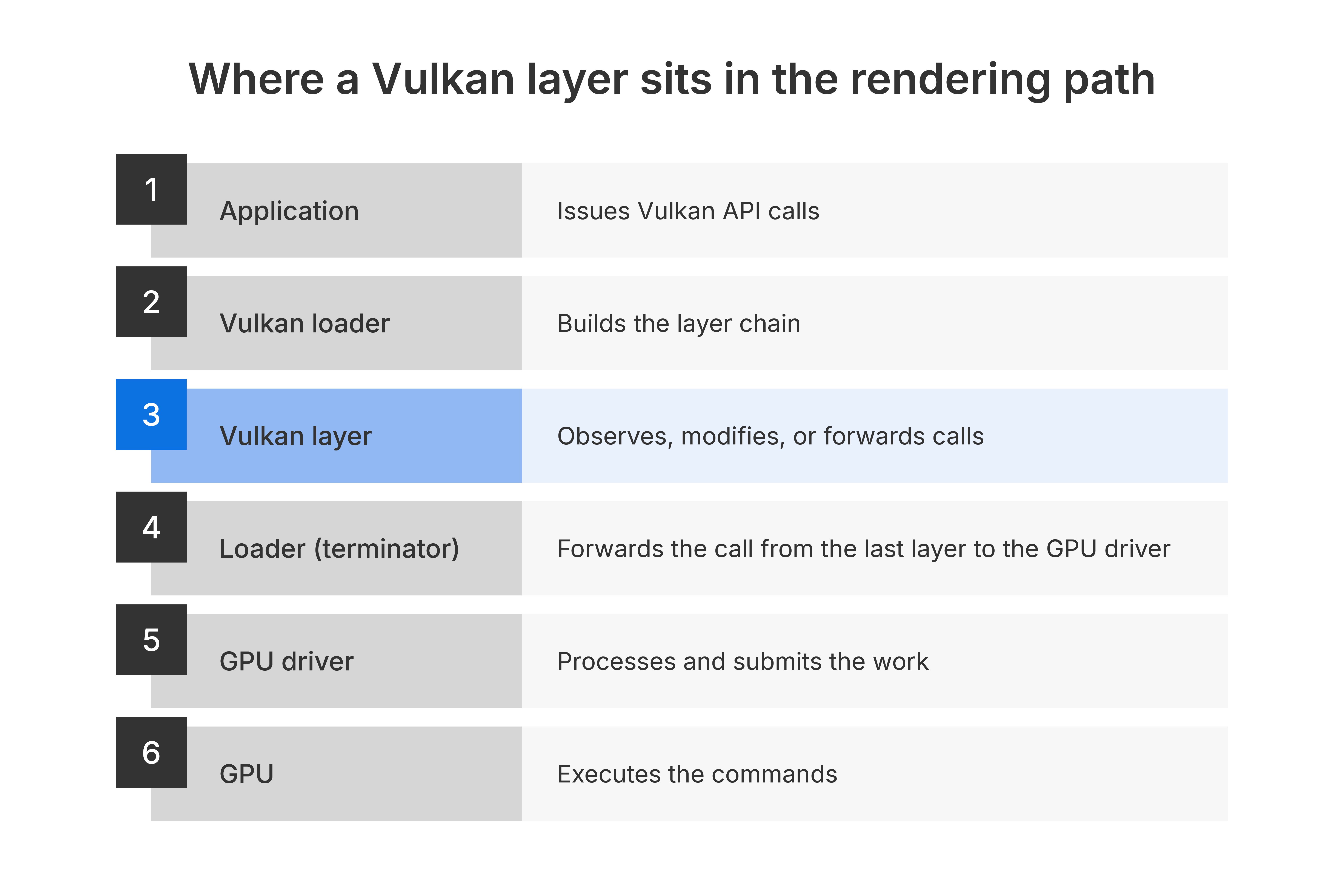
A Vulkan layer is code that sits between the application and the driver and sees every API call before the driver does. Layers can inspect parameters, track object state and lifetimes, validate usage against the spec, and emit errors and warnings. They also power frame capture, performance profiling, call tracing, and debug markers — that is, they are how the GPU debuggers above are built.
Layers are chained. Each one can observe the call, modify it, or forward it, and each of those decisions is the layer's own. This is the standard, supported way developers catch errors in Vulkan, and VK_LAYER_KHRONOS_validation is the tool every Vulkan developer has used.
The distinction that matters for security is between two kinds of layer:
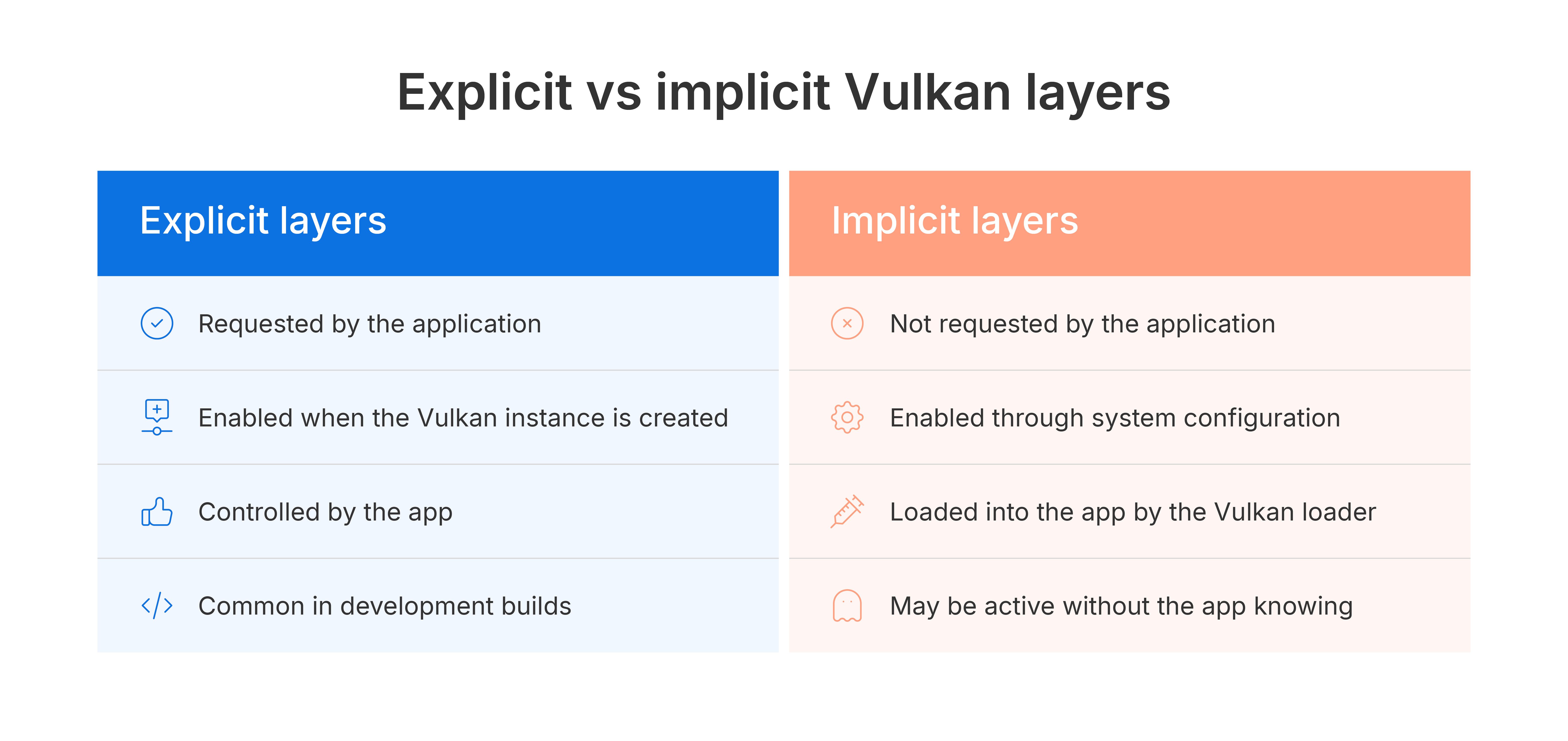
Explicit layers are requested by the application itself when it creates its Vulkan instance. The app decides. This is the development-build case, and it is not a problem.
Implicit layers are not requested by the application. They are enabled by system configuration, injected into Vulkan apps by the loader, and the app may have no idea they are active. They exist for overlays, capture tools, and instrumentation. They can affect production behavior.
On Android, a layer is a shared library that the Vulkan loader loads into the target application's process and negotiates an interface with. From a security perspective, there is only one fact to keep in mind:
A layer is arbitrary native code running inside another app's process, loaded by a trusted system component, through a fully supported path.
Android enables layers through a handful of global settings — which app to target, which layer to load, and, notably, which other installed app supplies the layer library. Since Android 10 the layer does not have to live inside the target at all: any installed app can act as the donor, and the loader will pull the library out of it and map it into the target's process.
The guard and its limitations
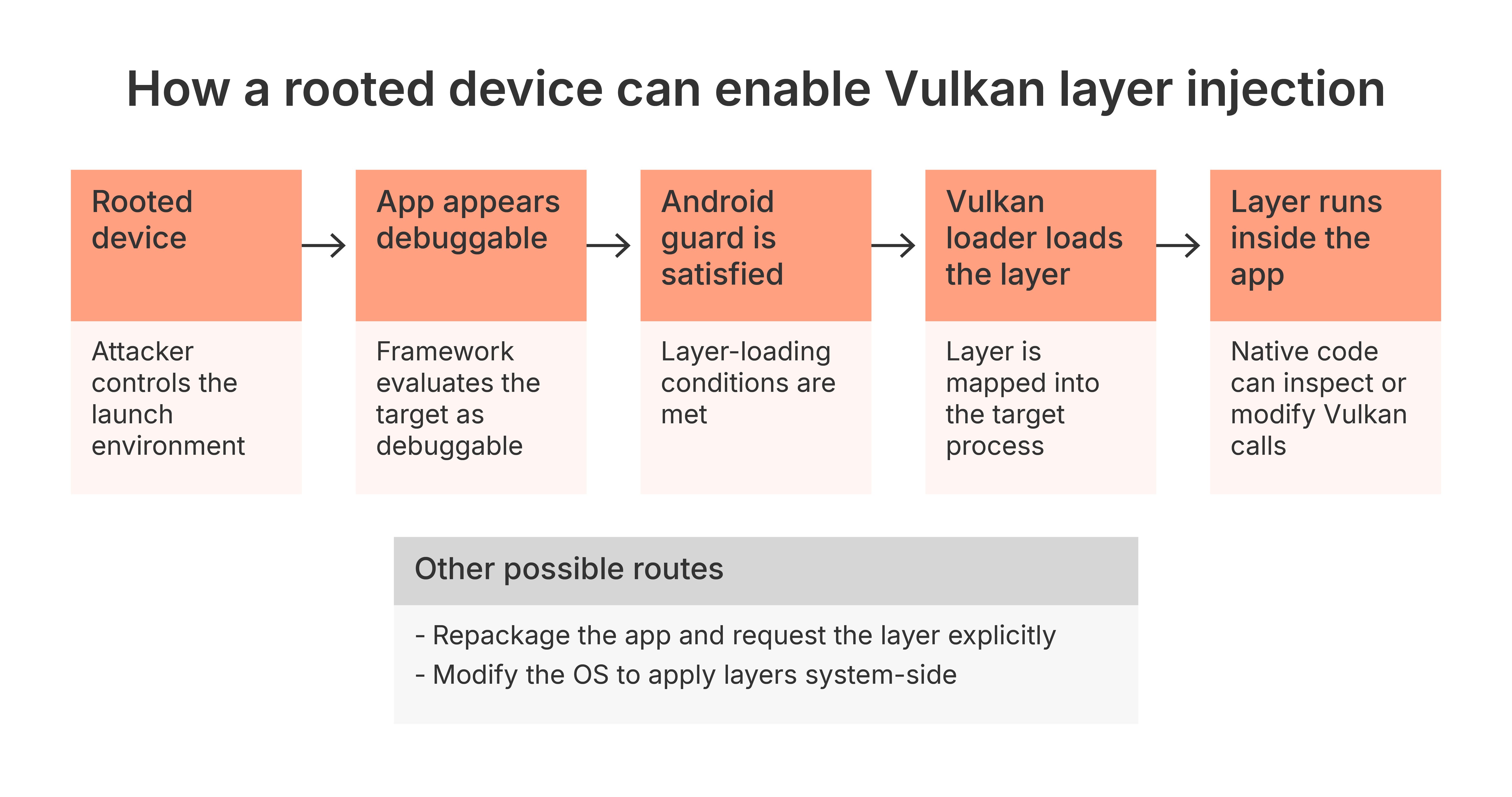
Android does apply a check. Layers are injected into an app only if one of the following holds: the app is debuggable, or the OS is a userdebug build granting root, or — on Android 11 and later — the app has voluntarily opted in with a manifest flag. On top of that, the global settings must name the app specifically.
Two things are worth noticing about that boundary. First, it is a set of process and build attributes, not a cryptographic one — nothing here is signed or attested. Second, the donor app, the separate APK that actually supplies the layer library, has no such requirement at all. It only has to be installed and to contain a native library for the right ABI.
In our research we got past it three ways:
-
Make the app look debuggable. The flag is evaluated by the framework when the app is launched. On a rooted device, that evaluation can be influenced — no change to the target app at all.
-
Repackage the app and have it ask for the layer explicitly. This requires defeating the app's own repackaging detection, but it needs no root.
-
Modify the OS so that layers are built in and applied system-wide.
For our research, we focused on the first route: using a rooted device to make the target app appear debuggable. This is how we demonstrated that a Vulkan layer could be loaded into the app through the supported Android mechanism.
Rooted or modified devices are the right threat model for mobile gaming. Rooted devices are where cheating happens, and "we only support stock devices" has never once stopped a cheat from being sold.
Read more: Root detection: What it is and how it works
What an attacker gains from Vulkan layer injection
Once a malicious Vulkan layer is loaded into the target process, it gives an attacker four distinct capabilities.
Undetected code execution inside the app
The layer is loaded as a shared library into the target process by the graphics loader. Reverse engineering and runtime manipulation follow immediately, and a full instrumentation framework such as Frida can be bundled straight into the layer. There is no ptrace attach, no injected thread, none of the artifacts that anti-tamper products are built to detect — because the load is performed by the operating system, using the same mechanism that loads the official validation layer.
Cheating at the GPU boundary
With visibility into the render command stream, an attacker can alter draw and dispatch behavior, change what resources are bound, insert extra draws, and manipulate post-processing. Two classic cheats fall straight out of it: ESP-style cheats, which learn where every object on screen is and mark them for the player, and simply removing things the cheater does not want to see — smoke, particles, anything that obscures the view.
The critical point is that this is a divergence between the CPU-side game state and what actually reaches the screen. Anti-cheat that validates game logic sees nothing wrong, because nothing in the game logic is wrong. The lie is downstream of everything the anti-cheat checks.
Convincing UI spoofing
Injected overlays are not floating windows drawn on top of the game. They are composited into the game's own frame, through the game's own rendering path. To the user and to the compositor, they are the app. Anything a player trusts because it appeared inside the game — a prompt, an offer, a balance, an account screen — can be fabricated.
Intellectual property and data theft
Everything handed to the GPU passes through the layer, after decryption and upload. That means frame captures including chat overlays and account information; extraction of textures, shaders, meshes, and pipelines; and enough pipeline state and descriptor data to reconstruct how a renderer works. For a studio whose engine and art pipeline are the product, that is the crown jewels leaving through a debugging interface.
Why standard anti-tamper detections miss Vulkan layer injection
It is worth being specific about this, because "undetected" is a claim that should be earned rather than asserted.
Cheats that operate at the GPU level on Android have historically had two places to stand, and both of them are below the graphics API.
The first is the ioctl boundary. GPU work reaches the kernel through a character device — /dev/kgsl-3d0 on Adreno, /dev/mali0 on Mali — and command submission is an ioctl on it (IOCTL_KGSL_GPU_COMMAND in Qualcomm's KGSL stack). Hook ioctl and you see every submission the process makes, and you can rewrite it on the way past.
The second is the mapped submit buffer. Command buffers live in memory shared with the GPU, allocated through the driver (IOCTL_KGSL_GPUMEM_ALLOC) and mapped into the process. Find that mapping and you can write GPU commands into it directly, behind the driver's back.
Both are effective, and both are exactly what runtime protection is built to catch. Hooking ioctl or mmap means patching code inside a loaded module — an inline hook over the function prologue, or a rewritten GOT/PLT entry — and that leaves artifacts. Prologue hashing catches the modified bytes. GOT integrity checks catch entries pointing outside the module that owns them. Mapping scans catch the unexpected executable region the trampoline lives in. This is well-trodden ground for anti-tamper products, and it works.
Learn more: App Threat Report: How do the top Android Apps perform against hooking?
A Vulkan layer bypasses these detections for five separate reasons.
1. Nothing is patched
There is no inline hook, no GOT rewrite, no trampoline. Every byte of libc, libvulkan.so, and the vendor's user-mode driver is original and will hash correctly. An integrity check over loaded modules returns clean, because the modules genuinely are clean.
2. The interception point is a function pointer the loader wrote itself
Layer dispatch tables are built by libvulkan.so as designed — the entries pointing into the layer are there because the loader put them there. Unlike a GOT entry, there is no canonical value for the app to compare against; a populated layer dispatch table is indistinguishable from a correctly populated layer dispatch table.
3. The ioctl traffic is genuine
This is the important one. The layer never touches /dev/kgsl-3d0 at all. It calls vkCmdDraw, and the vendor's own user-mode driver encodes the packet and issues the submission ioctl through its normal path. Anything watching that boundary sees a well-formed command submission, from the legitimate driver, on the app's own queue, with a plausible payload. There is no anomaly to spot, because at that level nothing anomalous is happening.
4. Nobody writes into the submit buffer
For the same reason, the shared GPU memory is filled by the driver, exactly as it would be for the app's own draws. There is no foreign module writing into a mapped command buffer, which is precisely the pattern a mapped-memory watch is designed to find.
5. The Vulkan layer loads before integrity checks run
The layer is loaded during instance creation, which happens before the app's integrity code has run. Any check the app performs is being performed in a process the layer has already been sitting in.
The honest limit: this is not invisible. The layer's shared object does appear in /proc/self/maps, loaded from an installed APK's library path, and an app that enumerates its own layer chain can see a layer it never requested. That residual signal is real, and it is the signal to build on — but it is a completely different detection from the ones most anti-tamper products are currently running.
This table shows why standard anti-tamper detections miss Vulkan layer injection. Vulkan layers operate through fully supported system paths. They leave no artifacts in the places conventional detections are designed to inspect.
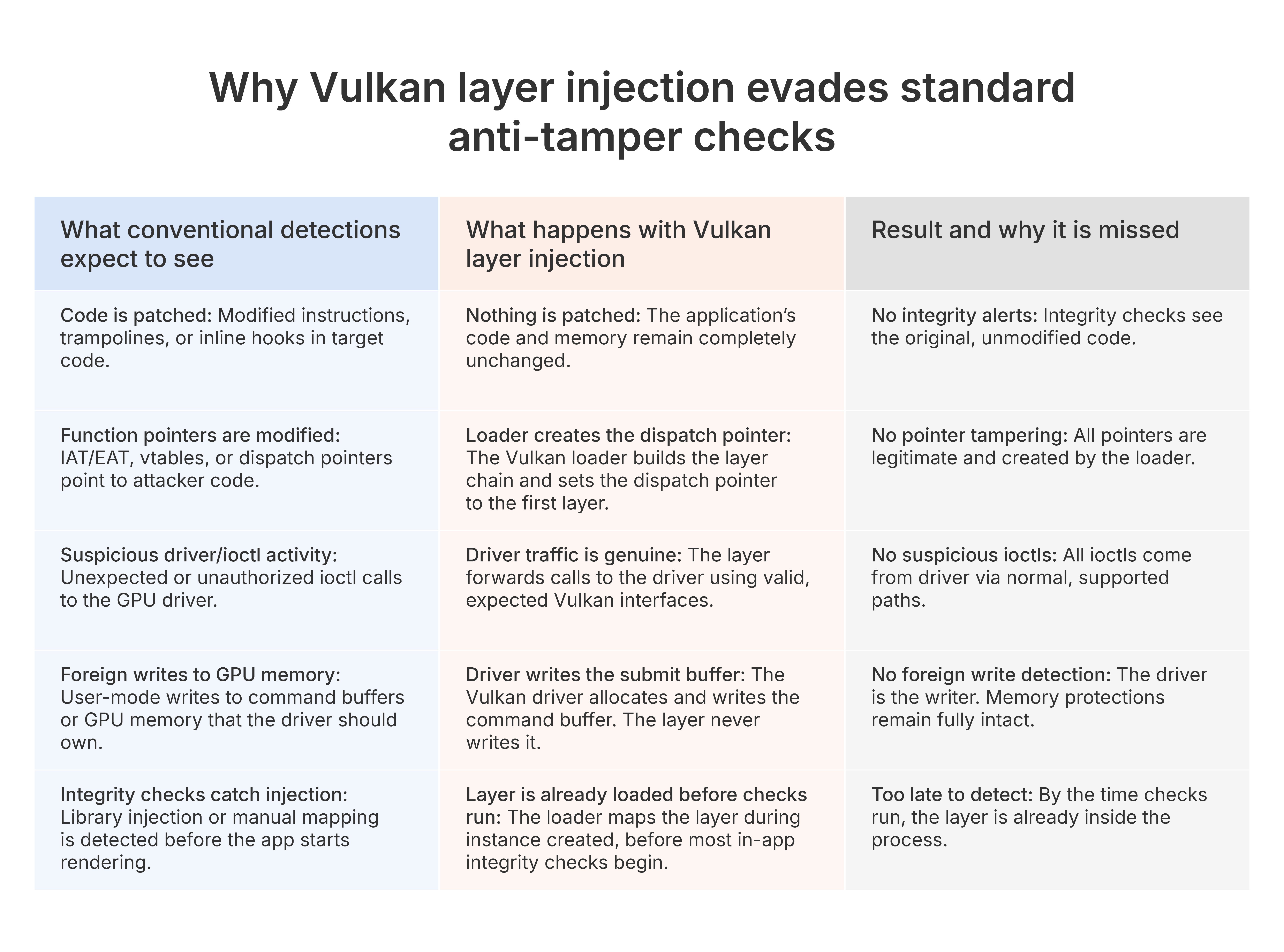
The net effect is that Vulkan layer injection operates completely within supported system behavior. It leaves no patching, no pointer tampering, no suspicious driver activity, no foreign writes, and it is present before integrity checks start. Conventional anti-tampering approaches are blind to it.
Which Android apps are exposed to Vulkan layer injection
This gets framed as a gaming problem because that is where the money is, but the mechanism is not game-specific. It applies to anything rendering through Vulkan on Android:
-
game engines, including Unity and Unreal
-
modern Skia applications with the Vulkan backend enabled
-
modern Flutter apps, which since Flutter 3.27 render through Impeller on Vulkan by default on Android API 29 and above
-
system applications
Anything in that list that draws sensitive content can have that content read. Anything whose interface users trust can have that interface forged.
The uncomfortable conclusion: Vulkan layer injection does not rely on a vulnerability
There is no vulnerability in this writeup. No memory corruption, no privilege escalation, no bug to report to anyone. Every component behaves exactly as designed: Vulkan is thin by choice, layers exist because validation had to go somewhere, and implicit layers exist because tooling needs them.
The attack is the composition — a supported extensibility mechanism, plus a device where the user controls the settings that drive it. That is why it is worth writing about. Designed-in extensibility is not something a patch removes.
For defenders, three implications follow:
-
Injection detection built around ptrace, preloading, code-integrity hashing, or ioctl and mmap hook artifacts will not see this. Nothing is patched and the syscall traffic is genuine. The load happens early, on the system's behalf, before most integrity checks have run.
-
An app can and should know what is in its own layer chain. Anything present that the app did not request is a signal, and it is a cheap one to collect.
-
Root and debuggable-state detection are now load-bearing, because every route in needs one or the other. Necessary — but on their own, no longer sufficient.
If you ship a Vulkan renderer on Android and your threat model stops at repackaging and process injection, the layer chain deserves an afternoon of your attention.
Research by the Promon research team, as part of ongoing work on emerging threats to gaming customers on rooted devices.
References
-
Vulkan validation layers on Android — the enable_gpu_debug_layers / gpu_debug_app / gpu_debug_layers / gpu_debug_layer_app settings, the loading conditions, and layer loading from a separate APK
-
AOSP GraphicsEnvironment.java — the debugLayerEnabled() / canInjectLayers() checks as actually implemented
-
Implement Vulkan (AOSP) — the loader at /system/lib[64]/libvulkan.so and where it searches for layers
-
Vulkan Tutorial: validation layers — minimal driver overhead, limited built-in error checking, undefined behaviour
-
Creating your own Wallhack and D3D model-recognition databases — the hooked-draw-call, depth-test-off technique in practice
-
ReShade forum: network monitoring and depth buffer — why depth access is disabled on network activity
-
Ninja Ripper — API takeover for mesh, texture, and shader extraction
-
Attacking the Qualcomm Adreno GPU (Project Zero) — /dev/kgsl-3d0, IOCTL_KGSL_GPU_COMMAND, and IOCTL_KGSL_GPUMEM_ALLOC as the real submission path
-
Method hooking detection and runtime code integrity checks — prologue hashing, GOT/PLT integrity, maps scanning, and their limits
-
Newzoo global games market forecast, 2025 — platform revenue split
-
Impeller rendering engine — Vulkan as Flutter’s default Android backend